
Meet Fieldr: The Team That Ships and Still Fails
The Story That Looked Clear
Module 0, Lesson 1

What you'll learn
You can identify the specific moment where "done" and "done correctly" diverge, and explain why a well-written ticket and green tests don't guarantee shared meaning.
Read this. Take five seconds.
As a dispatcher,
I want to filter open jobs by urgency
so that I can prioritize my work queue.

Acceptance Criteria:
- Jobs can be filtered by urgency level
- The filter shows High, Medium, and Low urgency jobs
- The filtered list updates in real time
Looks fine, right? Clear user goal. Three specific acceptance criteria. Standard format.
Friday, 4:47pm. Sprint review. Priya runs the Fieldr demo - urgency filter live, real data, jobs ranking in High, Medium, Low, the list updating in real time. Tom's test suite is green. Maya signed off Wednesday after a solid three-hour regression pass. The stakeholder leans forward from the back of the room.
"That's not what urgency means to us. Urgency is about SLA risk - which jobs are at risk of breaching our service-level agreement. This is just a priority label."
The room goes quiet.
Priya wrote that ticket. Tom built exactly what it said. Maya confirmed it does what it describes. The tests are green.
The feature is still wrong.
When the process works and the feature is still wrong
You need to know who these people are. You'll be following this team through the entire course.
Fieldr is a B2B SaaS product for field service management - dispatching field technicians, tracking job status, handling scheduling under real operational pressure. The kind of product where dispatchers work fast and failures have contractual consequences. The team has been building it for eighteen months under consistent delivery pressure.
Priya is the Product Owner. She owns the backlog, drives sprint planning, translates stakeholder conversations into tickets. Tom is a backend developer. He builds what the tickets describe, precisely and cleanly. Maya is QA. She verifies that what was built matches what the ticket said. Alex is the architect; he thinks about system structure, what's stable, and what's fragile. They've shipped together long enough to have rhythm.
Everyone did their job correctly. The feature is still wrong.
Three people, three different systems in their heads
Here's what actually happened on that ticket.
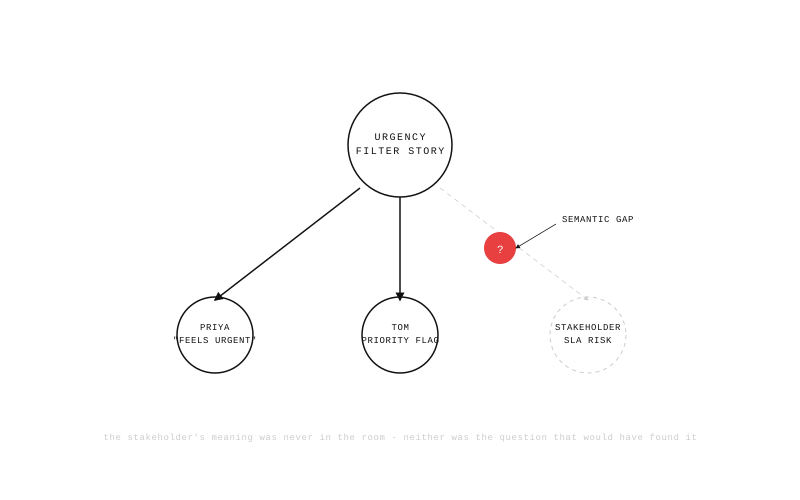
When Priya wrote "urgency," she was thinking about the word dispatchers use in conversation - the jobs that feel hot, the ones that get elevated. She'd had a brief stakeholder chat about this feature. The word felt self-explanatory.
When Tom read the ticket, he looked at the data model. There was already a priority field in the database with three values: HIGH, MEDIUM, LOW. Clean mapping. He built the filter against it, added real-time updates, wrote tests for all three states. Every AC passes.
When Maya tested it, she confirmed filtering by urgency level works, all three categories display correctly, real-time updates fire. All true. All green.
When the stakeholder saw it, they saw a priority flag, not the SLA-risk concept that "urgency" means in their domain. To them, urgent jobs are jobs at risk of missing a contractual service-level agreement. That's a different field entirely, with different business logic, and it wasn't in the database.
Three people worked from the same six-word concept. They built three different systems in their heads. A ticket that reads clearly to the person who wrote it is not the same as a ticket that means the same thing to everyone who reads it.
Why green tests aren't proof of shared meaning
This has a name: the Semantic Gap. It's the distance between the word in the ticket and the shared concept it's supposed to represent, and it's invisible right up until delivery. No warning in sprint planning. No flag in code review. No test failure. It surfaces at the sprint review, when the person who ordered the thing sees what "urgency" means to everyone except them.
The Semantic Gap is structural, not accidental. It doesn't happen because Priya wrote a vague ticket or Tom made a careless assumption. It happens because written language is imprecise, and in software development, three people with three different domain backgrounds read the same imprecise sentence and fill the gaps with their own knowledge. The gaps they fill look like understanding. They're not.
Green tests make this harder to see, not easier, because they feel like proof. They're not proof of shared understanding. They're proof of technical correctness. The filter works. It works against the wrong concept.
The failure lives between roles, not inside them
There's no villain in this story. Priya wrote a reasonable ticket - it was clear to her because she'd had the stakeholder conversation and the word felt unambiguous. Tom built exactly what it said. Maya confirmed the behavior matches the spec.
The process worked exactly as designed. That's what makes the Semantic Gap so persistent.
You can't fix it by asking Priya to write longer tickets. You can't fix it by asking Tom to ask more questions before he starts coding. You can't fix it by moving Maya earlier in the sprint. Every one of those changes helps at the margin - none of them closes the gap.
The failure lives between the roles, not inside any of them. It lives in the moment before the sprint started, when three people looked at the word "urgency" and never asked whether they meant the same thing.
Keep this story.
As a dispatcher,
I want to filter open jobs by urgency
so that I can prioritize my work queue.

Acceptance Criteria:
- Jobs can be filtered by urgency level
- The filter shows High, Medium, and Low urgency jobs
- The filtered list updates in real time
By the end of this course, you'll see exactly what's missing, and you'll know how to fix it before anyone writes a line of code.