
From Idea to User Stories with AI: A Backlog You Can Check


AI turns one line of idea into a backlog that looks finished, and that is exactly when to slow down. Type "a gallery where photographers share a shoot and clients pick their favorites" into any assistant. A minute later you have six epics, forty stories and acceptance criteria under every one. Each story has the right shape. Nothing on the screen tells you what is missing.
Writing was never the bottleneck. Checking is. A backlog you cannot check is a draft of wording, not a plan, and the questions it leaves open come back in the sprint.
AI writes a backlog that looks complete from a single line of idea, in minutes. This guide shows the order in which an idea becomes stories, how to check what the backlog is missing, and what belongs in a Jira or GitHub ticket so that a person or an agent can work from it.
We use one example throughout: the photo gallery above. A photographer shares a shoot, the client marks favorites, the photographer gets the final selection. Small enough to follow, with enough rules to go wrong.
A backlog that looks complete is the first thing to distrust
Plausible stories create a confidence the backlog has not earned. Each story reads well on its own. The gaps sit between them: the rule that two stories answer differently, the case no story names, the actor nobody mentioned. A model fills the page with what the typical product of this kind has. It does not know what yours is for.
A Mountain Goat article (15.09.2026) describes a product owner who presented 500 freshly written backlog items for a new product. The team could not say what was missing or whether the items served the market. The article suggests starting with 25 or 50 high-level epics instead. Our reading: the size is a symptom. The backlog was produced before anyone decided its shape, and AI makes that mistake cheap to repeat.
The bill arrives late. A developer opens story 23 in the second sprint and asks what happens when a client marks more images than the package includes. The answer becomes a meeting, a thread and a ticket edited in place. One developer article (dev.to, April 2026) makes the same point from the other side: AI should refine a draft a person wrote instead of generating the stories, because generated stories sound right and create an illusion of completeness.
Play the gallery idea through any assistant and look at what comes back. A typical result names favorites, comments, downloads and watermarks. The selection limit often goes missing, because the idea line never mentioned packages, and the package is usually the first thing a photographer asks about.
Three questions tell you whether to trust a backlog:
- Can you state the goal in one sentence?
- Can you survey the epics at a glance?
- For each story, can you say which decision it records?
If the answer to one of them is no, the backlog is not ready for tickets.
Decide what the product is for before you list what it does
Before epics, write down three things: the goal, the users and the non-goals. Half a page is enough. Without them an assistant gives you the expected features. With them it has something to argue against.
For the gallery it looks like this:
# Client Gallery: purpose

Goal: A photographer delivers a shoot and receives the client's
final selection without an email thread.

Users:
- Photographer: owns the gallery, sets the package size
- Client: opens a link, marks favorites, submits. No account.

Non-goals (v1):
- No image editing in the app
- No payment processing
- No public portfolio
The non-goals do the most work. "No payment processing" removes a whole epic the model would have added. "No account" changes how every client story starts. A model rarely invents a non-goal, so you have to write them yourself.
This is also the first conversation. The goal sounds obvious until a second person reads it and asks what "final" means. Then you know the gallery needs a state called submitted, and that submitting changes what the client may do afterwards. That is a decision, and no story has been written yet.
Map the epics first, then slice one or two
An epic list is the cheapest check a backlog has. The Mountain Goat article above starts at 25 or 50 high-level epics. For a small product like the gallery, a handful is enough. Either way, a person can tell in a minute whether one is missing. Forty stories do not allow that, and 500 certainly do not. So the epics come first, and only one or two of them get sliced into stories.
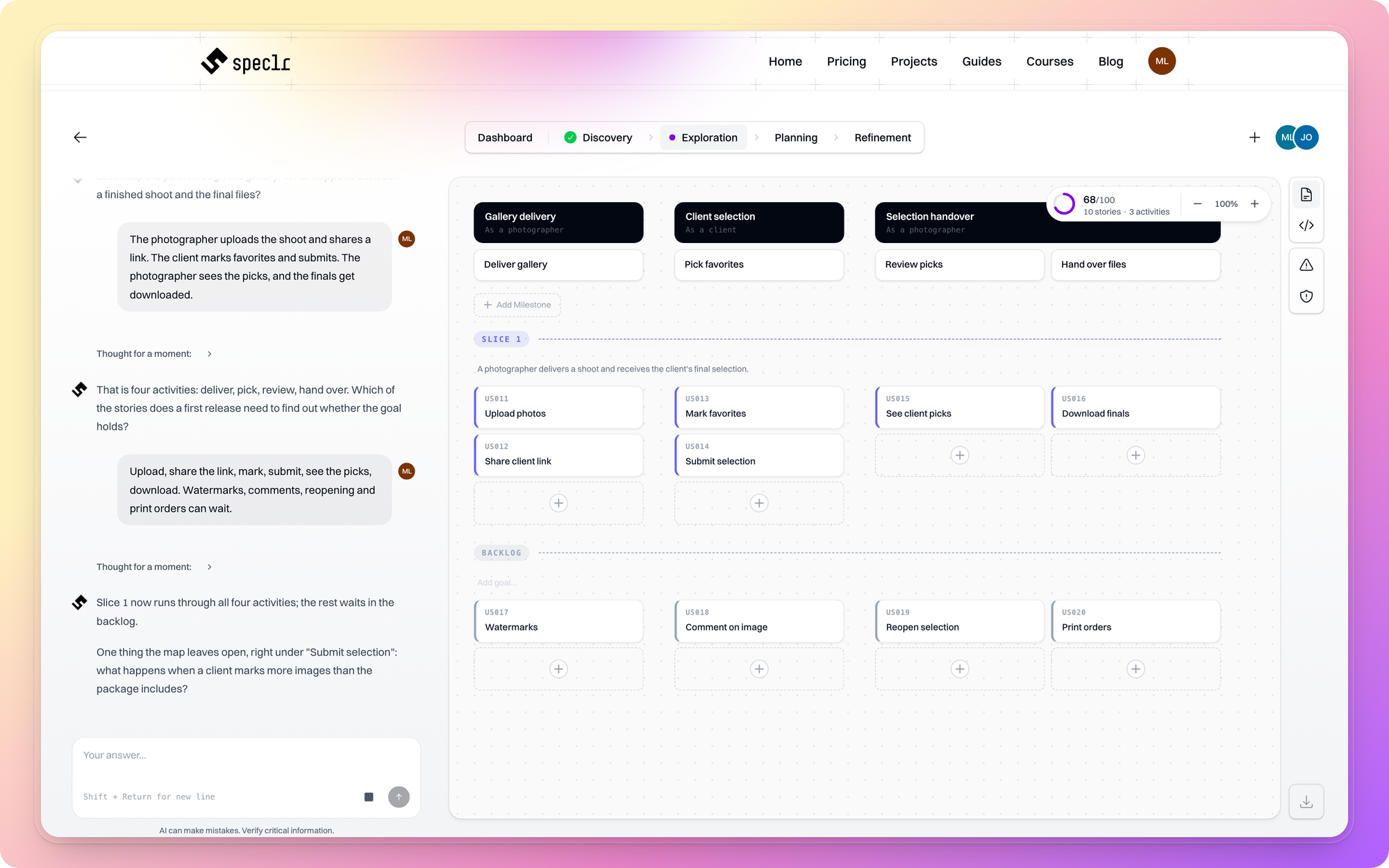
Classic user story mapping gives this a shape. Jeff Patton's map lays the product out as the path a user walks: the backbone is the sequence of activities, the stories hang below each activity, and a horizontal line cuts the first usable release across the whole map. You slice by what a user can do end to end, not by technical layer.
For the gallery, the backbone is four activities: deliver, pick, review, hand over. The first slice is the thinnest route through all four: upload, share the link, mark, submit, see the picks, download. Watermarks, comments, reopening a selection and print orders wait, because none of them is needed to find out whether the goal holds.
Slicing also limits how much detail you write up front. Mike Cohn argues that when AI can specify on demand, teams no longer need to pre-specify hundreds of stories months ahead (Mountain Goat, 29.09.2026). One or two sliced epics keep the detail close to the work.
A map also gives you a place to put the question from Section 1. "What happens over the limit?" becomes a card under "Pick favorites" that waits for an answer. On a flat list of forty stories it is invisible.
This is where Speclr comes in. Its Exploration phase builds the backbone and the epics with you, then slices stories along the map. Planning picks up the second half of the same map: milestones and the MVP line. Both phases stay in the same structure, so a story always knows which activity it belongs to. The AI proposes, you decide, and the live check flags a new story that contradicts an existing one before it lands in the backlog.
Acceptance criteria are where the conversation lands
A criterion is the written result of a conversation, not a replacement for it. The criteria record what the team agreed on, and the agreeing is the work. When AI writes criteria alone, nobody has agreed on anything yet.
Look at what a model produces for "Submit selection":
Scenario: Submit selection
  Given the client has selected images
  When the client submits the selection
  Then the selection is saved
It is correct. It is also useless for a developer. How many images are "selected images"? What does "saved" mean when the client may not change it afterwards? The criterion passes every review because it says nothing that could be wrong. The Mountain Goat article shows the same pattern with an expense app: generic criteria cover file types and size limits, while better ones follow what makes the product worth building, such as reading merchant, date and amount from a photo.
Research on generating criteria with language models shows the same limit. In the CrUISE-AC study, the model got issues from comparable systems as context, and five experts rated 80 to 82 percent of the generated criteria as relevant. The authors state that they do not check the criteria for conflicts with those of other stories. Nobody checks story 12's criteria against story 23's.
Pick the format by what the story contains:
- A checklist for simple things. "Gallery name: up to 80 characters. Shown in the client link." Two lines, no scenario needed.
- Gherkin when a rule or a sequence matters. It forces an example, and an example forces a number.
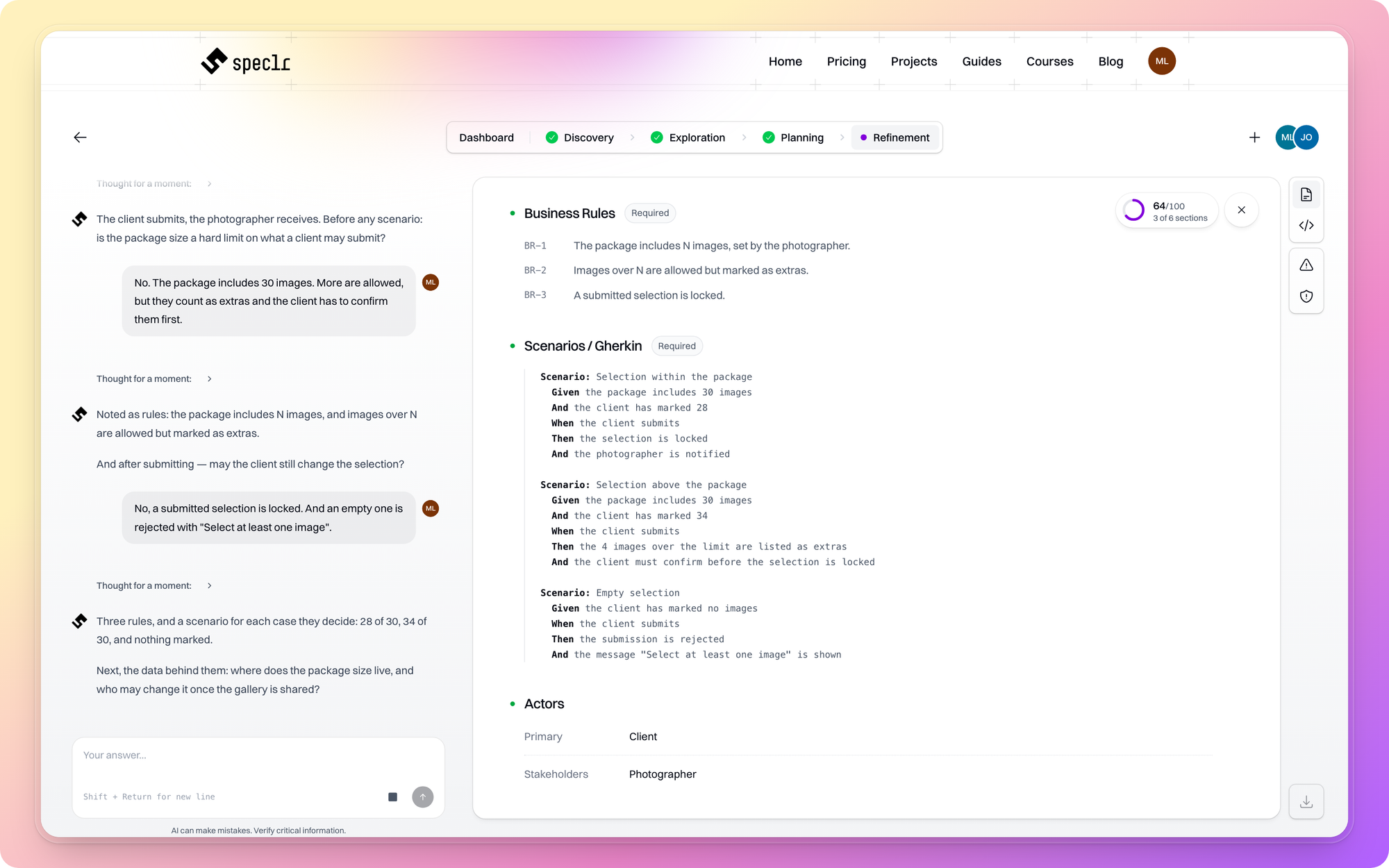
The gallery story has a rule, so it gets examples:
Feature: Submit selection
  Rule: The package includes N images. Extra images are allowed but marked.

  Scenario: Selection within the package
    Given the package includes 30 images
    And the client has marked 28
    When the client submits
    Then the selection is locked
    And the photographer is notified

  Scenario: Selection above the package
    Given the package includes 30 images
    And the client has marked 34
    When the client submits
    Then the 4 images over the limit are listed as extras
    And the client must confirm before the selection is locked

  Scenario: Empty selection
    Given the client has marked no images
    When the client submits
    Then the submission is rejected
    And the message "Select at least one image" is shown
Three scenarios, and two numbers nobody could have guessed from the idea line. The second scenario is the one the first draft was missing.
In Speclr, this is the Refinement phase. For each story it asks for the actors, the business rules and then the Gherkin criteria, and in that order, because the examples only make sense once the rules are written down. The rules come first, so the scenarios cannot drift from them. Perspective Agents (QA, security, architecture) then read the story and ask what it leaves open.
A ticket is a prompt
Whoever picks up the ticket starts from its text alone. That is true for a developer in the second sprint, and it is literally true for a coding agent. GitHub's guidance for the Copilot cloud agent treats the issue as the prompt. It asks whether the description would work as one, and names a clear problem description, complete acceptance criteria and, where useful, the files to change. A ticket that says "As a client I want to submit my selection" gives the agent the same freedom it gave the model that wrote the story. We showed the same mechanism for a whole feature in How to Write a PRD for Claude Code and Cursor: the agent builds what the document says and guesses the rest.
So a ticket carries the result of the conversation:
- Context: which epic, which user, why the story exists.
- Business rules, stated as rules.
- Acceptance criteria, with numbers.
- Out of scope, so the agent does not invent more.
- Parent, so the ticket sits in the structure.
- Files or areas to touch, only where the agent would otherwise have to guess. It can search the codebase on its own.
Written out, the right-hand ticket looks like this:
## Client submits final selection

Context: Epic "Client selection". The client has no account
and opens the gallery through a link.

Rules:
- The package includes N images, set by the photographer.
- Images over N are allowed but marked as extras.
- A submitted selection is locked.

Acceptance criteria:
- 28 of 30 marked: selection is locked, photographer is notified
- 34 of 30 marked: 4 extras are listed, client confirms first
- 0 marked: submission is rejected, message "Select at least one image"

Out of scope: payment, reopening a selection.
Jira. Two mechanics decide whether the import works. Jira has no built-in acceptance criteria field, so the criteria go into the description or a custom field you create [CHECK: old community thread, confirm against current Atlassian docs]. And the parent field normally points one level up: a story to its epic, a sub-task to its story. For a CSV import, give every row a Work item ID, a Work type and, where it applies, a Parent. Parents must appear before their children, so epics come first, then stories, then sub-tasks. Older Atlassian docs call these columns Issue Id and Issue Type.
GitHub. The issue body is the prompt. Put the rules, the scenarios and the out-of-scope list into it. The agent searches the codebase on its own, but it cannot search your conversation. Whatever was decided and not written down is not available to it.
Speclr exports both ways. For Jira it writes the epic and story structure. For the repository it writes files the agent reads directly: a managed block in AGENTS.md or CLAUDE.md, and one file per story next to its .feature file.
AGENTS.md                      # managed block between speclr markers
docs/
features/
  client-selection/
    us-014-submit-selection.md
    us-014-submit-selection.feature
The export is one way, and every file starts with a header: "Generated by Speclr · edit in Speclr · exported <date>". The conversation stays in Speclr, and the repo gets its result.
[V4 · Screenshot: Speclr export dialog with Jira and repository files. Caption: "Example: one story as a Jira issue and as repository files." Michael supplies.]
Common mistakes
- Criteria in the summary field. The summary is limited to 255 characters and gets cut off in boards and lists. Put criteria in the description or a dedicated field.
- Stories without a parent. An orphan ticket cannot be found by epic and cannot be checked against the map.
- "Handle errors" as a criterion. Name the error and the message, or the agent will choose both.
- Criteria without numbers. "Reasonable limit" is not a limit. The developer picks a number, and nobody agreed to it.
- Slicing by layer. "Build the API" is not a story. A client who can submit is. A layer cannot be demonstrated, so nobody can check it against the goal.
Not every task needs the long way
The path above is for new behavior with rules. Many changes need none of it, and running them through five steps is its own mistake.
A bug fix with clear reproduction steps is a ticket on its own: steps, expected result, actual result. A copy change is a line in a description. A plain create, read, update and delete screen with no rules does not need scenarios, because no scenario would say anything the title does not.
The test: would someone have to guess while implementing this? If yes, talk it through and write it down. If no, write the ticket and move on. The three examples above come from the dev.to article, which recommends skipping AI-assisted story writing for bug fixes with clear repro steps, copy changes and straightforward CRUD work. Ordinary refinement is faster there.
The ticket records a decision
The ticket should record a decision that was made, not replace the conversation. Whoever lets AI skip the epic level gets a backlog nobody can check. Whoever puts the conversation before the ticket gets a ticket an agent can execute.
- How do I turn an idea into user stories with AI?
Write the goal, users and non-goals first. Ask the AI for epics and review them on one screen. Slice one or two epics into stories, then write rules and examples per story. Generating forty stories from one line skips the checks.
- What should acceptance criteria for AI-generated user stories look like?
A checklist for simple things, Gherkin for rules and sequences. Each criterion names a number, a state or a message. A criterion that cannot fail checks nothing.
- How do I get AI-generated user stories into Jira?
Export or write a CSV with Work item ID, Work type and Parent columns. Parents come before their children: epics first, then stories, then sub-tasks. Put acceptance criteria in the description or a custom field, because Jira has no built-in one [CHECK].
- Can I assign a GitHub issue to a coding agent?
Yes. GitHub's guidance treats the issue as the agent's prompt. Include a clear problem description, acceptance criteria, the rules and an out-of-scope list, and name files only where the agent would otherwise have to guess.
- Do I need user stories for every change?
No. Bug fixes with clear steps, copy changes and plain CRUD screens do not need the full path. Use it when someone would otherwise have to guess.

Your next backlog, in the right order
Take your next idea through the same order. Speclr is free for 14 days.
Get startedTags
Sources
- Mountain Goat Software, AI-Generated User Stories Need Human Judgment
- Mountain Goat Software, Product Backlogs in the Age of AI
- DEV Community, Stop Asking AI to Write Your User Stories
- GitHub Docs, Issue writing for the Copilot cloud agent
- Atlassian Support, Import data from a CSV file
- Jeff Patton, The New Backlog
- arXiv 2501.15181, CrUISE-AC study on LLM-generated acceptance criteria