
The short version
Spec Kit gives you
A constitution and a fixed order of commands for your coding agent, from specify and clarify to plan, tasks and implement. Every step writes markdown into your repo. It is free, MIT licensed, and runs inside your agent.

 Speclr gives you
An AI that interviews your team through discovery, exploration, planning and refinement, and ends with user stories and Gherkin scenarios an agent can build from. It runs in your browser, with the AI included.
If the requirements live in one head, Spec Kit alone may be all you need. If they are spread across several heads, read on.
What Spec Kit is good at
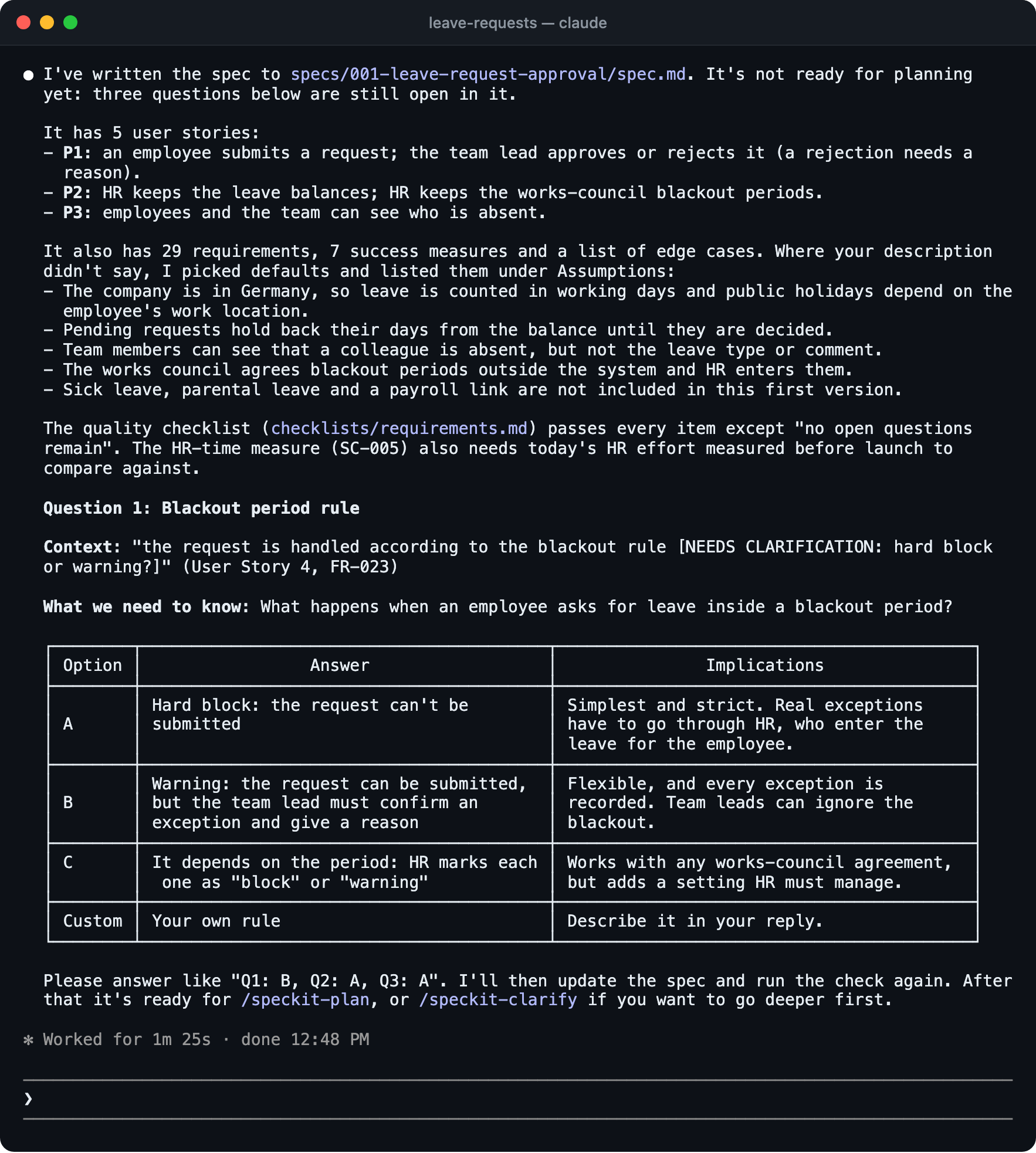
Spec Kit gives your agent a repeatable process. You write a constitution once, and every feature then goes through the same commands. The spec, the plan and the task list sit next to the code and show up in every diff. The commands install as agent skills for a long list of coding agents, there is no account, and it costs nothing.
Where it gets hard when requirements belong to more than one head
Say your team is building a leave-request flow. The HR lead knows the approval rules and the works-council constraints, a second person knows the payroll side, and a developer runs the first command.
The clarifying questions go to whoever sits at the terminal. That is the developer, who answers about exception cases from a best guess. The spec records the guess as a decision, and the HR lead sees it for the first time in a pull request. Spec Kit does not prescribe how a team collaborates on the spec, and that is a reasonable choice for a tool that lives in the repo. It also means the people with the answers have to find their own way in.
What Speclr does instead
- The AI asks, the people answer.Speclr guides the team through established formats: a discovery interview, story mapping, and a three-amigos style refinement. The questions go to whoever can answer them, not to whoever has the terminal open.
- One workspace for everyone involved.Product owner, developer and domain expert work in the same project and edit the same artifacts. Nobody reviews a copy.
- Small enough to review.The result is a set of user stories with a few agreed Gherkin scenarios each, not a stack of documents. Your agent reads the scenarios, and so can the HR lead.
- Nothing gets forgotten.What the team settled in discovery stays available as domain knowledge in refinement, and contradictions in it are detected. Risks are identified and managed in the project, and perspective agents check the result for consistency, risk, quality, security and architecture.
- Your material comes in.Upload interview notes, documents or photos of workshop results. Speclr extracts and classifies the content, and your team goes through it together in Review Files before anything is worked in.
Where Spec Kit is stronger
- The spec lives in the repo and changes with the code. Speclr exports the spec into your SCM, ticket system or wiki, or as a download for your agent, but the project stays in Speclr instead of changing with the code.
- It covers the whole path to code. Speclr follows implementation progress through issue and branch states, but it does not write code and does not check code against the spec.
- It is free, needs no account, and works with a long list of agents today.
- A constitution enforces your engineering principles on every feature. Speclr does not do that.
Use both
Speclr can export the spec as Git issues or into your Git repository, which is where Spec Kit’s commands pick it up. The spec arrives as plain files and issues, so nothing stops you from running Spec Kit on top of it.
Spec Kit is free. Why pay for Speclr?
Spec Kit is free and open source, and you pay only for your coding agent. Speclr starts at $29 a month, billed annually, and the AI usage for the spec work is included, so there is no separate model subscription for this part. What you pay for is the conversation that gets several people to one spec, which a command flow in a repo is not built to do.
| What is compared | Spec Kit | Speclr |
|---|---|---|
| Price | Free, MIT licensed. You pay for your coding agent. | From $29 a month, billed annually. AI usage included in the plan. |
| Where it runs | Inside your coding agent, in your terminal. | In your browser. |
| Who asks the questions | Your agent, to the person at the terminal. | The AI, to everyone in the project. |
| Who can take part | Everyone who works in the repo. | Anyone you invite to the project. |
| Where the spec lives | Markdown on the branch you ran it from. | A project in your workspace, exported to your SCM, ticket system or wiki, or downloaded for your agent. |
| What you get | Spec, plan and task list for one feature. | User stories and Gherkin scenarios, from vague idea to refined spec. |
| After the spec | Plan, tasks, implement, converge. | Export to your tools or hand it to your coding agent, and see implementation progress through issue and branch states. |
Questions
For the spec, yes. Speclr does not write or check code, so your agent still does that, with or without Spec Kit’s commands.
Last updated 13 November 2026. Spec Kit details from its documentation and license, checked 13 November 2026. Found something out of date? Tell us at contact@speclr.dev.